 By Ethan Brooks
Updated November 2026
Zoom bone conduction headphones are open-ear headsets that send sound through your cheekbones instead of your ear canal, and many are built with noise-canceling microphones and mute controls for video meetings. If you spend hours on Zoom calls and want to hear your surroundings while staying reachable, this list is for you. The picks below were chosen by comparing manufacturer specifications, brand reputation and the patterns owners commonly report, with a focus on call clarity, mic quality, battery life, connectivity and comfort over a full workday.
Our top picks at a glance
- 1
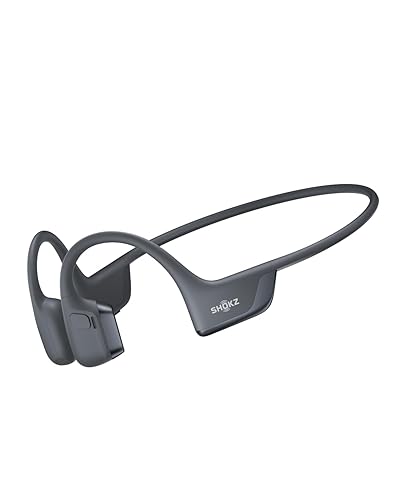
 TOP CHOICEBest overallSHOKZ OpenComm2 UC Open-Ear HeadsetView on Amazon
- 2
 TOP CHOICEBest for Mac and PC usersSHOKZ OpenComm2 Open-Ear Bluetooth HeadsetView on Amazon
- 3
 TOP CHOICEBest for outdoor workoutsBone Conduction Waterproof HeadphonesView on Amazon
- 4
 Best for USB dongle setupsOpen Ear Wireless Bluetooth Headset with USB DongleView on Amazon
- 5
 Best budget pickOpen Ear Headphones with Mic, 29g Bluetooth HeadsetView on Amazon
- 6
 Best for casual listeningRaycon Bone Conduction HeadphonesView on Amazon
Our Top Picks
Quick Comparison
| Product | Best for | Key feature |
|---|---|---|
| SHOKZ OpenComm2 UC Open-Ear Headset | Office calls and Zoom certification | Zoom-certified with mute button and USB-C dongle |
| SHOKZ OpenComm2 Open-Ear Bluetooth Headset | Mixed Mac and PC setups | Mute button with PC and Mac compatibility |
| Bone Conduction Waterproof Headphones | Workouts and outdoor use | Water-resistant build with noise-reducing mic |
| Open Ear Wireless Bluetooth Headset with USB Dongle | Desk-based remote work | AI noise-canceling mic on a boom arm |
| Open Ear Headphones with Mic, 29g Bluetooth Headset | Lightweight all-day wear | Dual device connection with mute |
| Raycon Bone Conduction Headphones | Casual calls and general listening | Sweat and water-resistant open-ear design |
SHOKZ OpenComm2 UC Open-Ear Headset
Zoom Certified;Bone Conduction Headphones;Mute Button for Work Calls and Meetings;16-Hour Battery Life & Quick Charge SHOKZ OpenComm2 UC Open-Ear Headset, USB-C Dongle, Noise-Canceling Mic
Best for: Office workers who need a Zoom-certified headset for daily calls
This model suits people who join video meetings from a desk or conference setting and want a headset that works reliably with Zoom’s certification requirements. Its open-ear design lets you hear coworkers and background conversation while you speak.
Key specs:
- Zoom certified, as stated in the listing name
- Mute button for call control
- USB-C dongle for computer connection
- Noise-canceling microphone
- Battery life of about 16 hours, per the listing
Pros:
- Zoom certification simplifies compatibility with meeting software
- Open-ear fit reduces ear fatigue during long calls
- Mute button makes it easy to silence your mic quickly
Cons:
- The USB dongle is one more accessory to keep track of
- Bone conduction can sound less full than sealed headphones for music
Bottom line: A strong first choice for professionals who want certified call performance and an easy mute control.
SHOKZ OpenComm2 Open-Ear Bluetooth Headset
Bone Conduction Headphones;Mute Button for Work Calls and Meetings; PC and Mac Compatible;16-Hour Battery Life & Quick Charge SHOKZ OpenComm2 Open-Ear Bluetooth Headset, Noise-Canceling Mic
Best for: Users switching between Mac and PC who want Bluetooth flexibility
This version is aimed at people who use both Apple and Windows machines or phones and want a Bluetooth connection rather than relying on a dongle alone. It shares the same open-ear, mute-equipped design as its UC sibling.
Key specs:
- PC and Mac compatibility, as stated in the listing name
- Bluetooth connectivity
- Mute button for work calls
- Noise-canceling microphone
- About 16 hours of battery life, per the listing
Pros:
- Works across Mac and PC without extra setup
- Open-ear comfort suits long sessions
- Quick charge helps with busy schedules
Cons:
- Bluetooth can introduce slight latency compared with wired audio
- Non-UC model may lack the dedicated certification features of the UC version
Bottom line: Good for mixed-device users who need Bluetooth flexibility for video calls. You may also like 6 Best Pyle Bone Conduction Headphones of 2026.
Bone Conduction Waterproof Headphones
Bone Conduction Waterproof Headphones , Bluetooth 6.0, 22g Lightweight Open Ear Headphones with Noise-Reducing Mic, Clear Balanced Audio, 10H Playtime, Water-Resistant for Running, Cycling & Workouts
Best for: Active users who take calls during workouts or outdoor errands
If you join calls while running, cycling or working out, a water-resistant open-ear design matters more than a formal office setup. This pair is marketed for those conditions and keeps the ear canal open for ambient awareness on the street.
Key specs:
- Bluetooth 6.0, as stated in the listing name
- Weight of about 22 g, per the listing
- Noise-reducing microphone
- Around 10 hours of playtime, per the listing
- Water-resistant build
Pros:
- Lightweight design suits extended wear during exercise
- Water resistance handles sweat and light rain
- Open-ear design keeps you aware of traffic
Cons:
- Water resistance is not the same as full waterproofing for swimming
- Mic performance in windy outdoor settings can vary
Bottom line: Best for people who want Zoom-capable calls on the move rather than at a desk.
Open Ear Wireless Bluetooth Headset with USB Dongle
Open Ear Wireless Bluetooth Headset with USB Dongle for PC, AI Noise Cancelling Mic, Air Conduction Headphones with Microphone Boom, Bluetooth 5.3 Headset for Call Office Remote Work Sports Driving
Best for: Desk-based remote workers who want a low-latency USB connection
This headset combines a Bluetooth connection with a USB dongle and a boom microphone. It suits remote workers who spend most of the day at a desk and want stable audio for calls, with an AI noise-canceling mic to reduce background sound.
Key specs:
- Bluetooth 5.3, as stated in the listing name
- USB dongle for PC connection
- AI noise-canceling microphone on a boom arm
- Open-ear air conduction design
Pros:
- USB dongle can offer more stable audio than standard Bluetooth
- Boom mic helps isolate your voice
- Suitable for both calls and driving use, per the listing
Cons:
- The boom arm adds bulk compared with slimmer designs
- Air conduction differs from true bone conduction, so check the design if you prefer cheekbone transmission
Bottom line: A practical choice for desk workers who prioritize mic clarity and a dongle connection.
Open Ear Headphones with Mic, 29g Bluetooth Headset
Open Ear Headphones with Mic, 29g Bluetooth Headset, Air Conduction Headphones with Dual Device Connection & Mute, Wireless Headset with Mic for Work, Driving, Office, Workout, Black
Best for: Budget-minded buyers who want a light, all-day headset for calls
At 29 g, this option is light enough for extended wear, and its dual device connection suits people who switch between a laptop and a phone during the day. It is a sensible pick when you want the basics without premium-tier features.
Key specs:
- Weight of 29 g, as stated in the listing name
- Dual device connection
- Mute function
- Built-in microphone
- Black color option
Pros:
- Lightweight design for all-day comfort
- Dual device connection simplifies switching
- Mute control is handy for quick silencing
Cons:
- Call quality in noisy spaces may trail more specialized mics
- Fewer certification or compatibility claims than dedicated UC headsets
Bottom line: A solid budget pick for light, everyday call use rather than critical video meetings.
Raycon Bone Conduction Headphones
Raycon Bone Conduction Headphones – Open Ear Running Headphones & Bluetooth Earbuds, Sweat & Water-Resistant with Mic (Gray)
Best for: Casual users who want open-ear audio for calls and everyday listening
This model leans toward general-purpose use, with open-ear comfort and a sweat- and water-resistant build. It fits people who want a headset that works for music, podcasts and occasional calls rather than a dedicated office tool.
Key specs:
- Bone conduction, open-ear design, per the listing name
- Sweat and water resistance
- Built-in microphone
- Gray color option
Pros:
- Open-ear design keeps you aware of surroundings
- Sweat and water resistance suits light exercise
- Works well for music as well as calls
Cons:
- Not positioned as a dedicated Zoom-certified or UC headset
- Mic performance may be less refined than specialized office models
Bottom line: A versatile choice for casual callers who also want decent everyday listening.
Buying Guide
Zoom Certification and Platform Compatibility
Zoom certification indicates that a headset has been validated for use with Zoom’s audio and call controls, which can reduce echo and dropped mute states. Check the product name and manufacturer documentation for a Zoom-certified label, and confirm that your computer’s operating system is supported. Certification matters most for daily meetings where audio quality directly affects your work.
Good picks for this: SHOKZ OpenComm2 UC Open-Ear Headset, SHOKZ OpenComm2 Open-Ear Bluetooth Headset
Microphone Quality and Noise Reduction
Open-ear designs place the microphone away from the ear canal, so mic placement and noise-reduction processing shape how clearly you come across. Look for boom arms or noise-canceling mics, and consider where you usually take calls. Quiet offices and noisy streets demand different performance.
Good picks for this: Open Ear Wireless Bluetooth Headset with USB Dongle, Bone Conduction Waterproof Headphones
Connection Type: Bluetooth, USB Dongle or Both
Bluetooth offers easy pairing with phones and many laptops, while a USB dongle often provides a more stable connection for desk setups. Some headsets offer both. If you switch between devices, check whether dual device connection is supported.
Good picks for this: Open Ear Wireless Bluetooth Headset with USB Dongle, Open Ear Headphones with Mic, 29g Bluetooth Headset
Battery Life and Charging
Battery claims vary with volume, mic use and temperature. Manufacturers often specify playtime under specific test conditions, so treat listed hours as a guideline rather than a guarantee. For a full workday, look for around 10 hours or more and a quick-charge option if you forget to charge overnight.
Good picks for this: SHOKZ OpenComm2 UC Open-Ear Headset, Bone Conduction Waterproof Headphones
Weight and All-Day Comfort
Lighter headsets generally cause less pressure on the cheekbones over long sessions. A 22 g or 29 g design is typically more comfortable for extended wear than heavier models. Adjust the band or fit so the transducers sit lightly against the skin without pressing hard.
Good picks for this: Bone Conduction Waterproof Headphones, Open Ear Headphones with Mic, 29g Bluetooth Headset
Water and Sweat Resistance
Water resistance ratings describe protection against sweat and light moisture, not submersion. If you exercise outdoors or in humid conditions, look for a stated resistance level and avoid assuming the headset is suitable for swimming unless the manufacturer says so.
Good picks for this: Bone Conduction Waterproof Headphones, Raycon Bone Conduction Headphones
Durability and Care
Wipe the transducer pads and mic grille with a dry or slightly damp cloth after sweaty sessions, and avoid soaking the unit unless it is rated for that. Store the headset in a dry case, and keep the charging port free of debris. Regular care helps maintain both mic clarity and battery health.
Good picks for this: SHOKZ OpenComm2 Open-Ear Bluetooth Headset, Raycon Bone Conduction Headphones
FAQ
Are zoom bone conduction headphones good for long meetings?
Many open-ear designs are built for extended wear because they do not seal the ear canal. Comfort still depends on fit, weight and how tightly the band sits, so take short breaks during very long sessions.
Do I need a Zoom-certified headset for video calls?
A certified headset is not strictly required, but certification can reduce compatibility issues and improve call controls. If your organization relies on Zoom heavily, a certified model is a safer choice.
Can coworkers hear me clearly through bone conduction headphones?
Call clarity depends mainly on the microphone and its noise reduction. Boom mics and noise-canceling mics generally perform better in shared or noisy spaces than basic built-in mics.
Is a USB dongle better than Bluetooth for calls?
A USB dongle often provides a more stable connection for desk use, while Bluetooth is more convenient for phones and mobile work. Many people use a dongle at the desk and Bluetooth elsewhere.
Are bone conduction headphones safe for daily use?
Open-ear designs leave the ear canal uncovered, which many users find comfortable for long periods. Keep volume at a moderate level, and consult a healthcare professional if you have concerns about hearing or skin irritation.
Can I use these headphones for music as well as calls?
Yes, most models support both. Bone conduction typically sounds less full in the bass than sealed headphones, so they suit spoken audio and everyday listening better than critical music listening.
How long do the batteries last on these models?
Listed battery life varies by model and usage. Several manufacturers specify around 10 to 16 hours, depending on volume and features. Real-world results will vary, so check the specification for the model you choose.
Conclusion
For most office and Zoom users, the SHOKZ OpenComm2 UC Open-Ear Headset is the most straightforward fit because of its Zoom certification and mute control. Mixed Mac and PC users may prefer the SHOKZ OpenComm2 Open-Ear Bluetooth Headset, while active users who take calls outdoors will find the Bone Conduction Waterproof Headphones more suitable. Desk workers who value mic isolation can consider the Open Ear Wireless Bluetooth Headset with USB Dongle, budget-minded buyers may lean toward the 29 g Open Ear Headphones with Mic, and casual users who want general listening may find the Raycon Bone Conduction Headphones a versatile option.
Sources
- Rules and guidance on wireless devices and radio frequency compliance (fcc.gov)
- Information on noise exposure and protecting hearing health (cdc.gov)
- Background on hearing loss, sound levels and prevention (nidcd.nih.gov)
Related reading
- Open-Ear and Bone Conduction Headphones Explained
- Best Bone Conduction Headphones for Sports: 3 Models Compared
- Xiaomi Bone Conduction Headphones Pairing: Step-by-Step Guide (2026)
- Wireless Bone Conduction Headphones UK: How to Choose the Right Pair (2026)
- Wireless Bone Conduction Headphones Aftershokz: 5 Best Picks Compared (2026)
- Wired Bone Conduction Headphones with Microphone: How to Choose the Right Pair
About Ethan Brooks
Ethan Brooks is part of our editorial team and reviews and edits our headphone tech & types guides, checking product details against manufacturer specifications and owner feedback.