 By Ethan Brooks
Updated November 2026
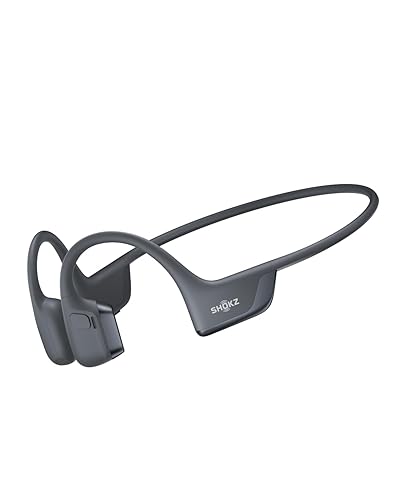
Bone conduction headphones Aftershokz are open-ear listening devices that send sound through your cheekbones instead of your ear canal. In this guide, you will learn how the technology works, how to choose the right Aftershokz model for your needs, how to fit it for the best sound and comfort, and which habits keep your ears safe over long sessions. Each section is practical, so you can work through it in order or jump to the part you need.
How Aftershokz Bone Conduction Technology Works
Standard earbuds and over-ear headphones push sound waves into your ear canal, where they vibrate the eardrum. Bone conduction skips that path. A small transducer rests against your temple or cheekbone just in front of the ear and sends vibrations through the bone of the skull directly to the inner ear. Because the ear canal stays open, you can hear traffic, conversations and announcements while you listen to music or calls.
Shopping for one? See our guide: AfterShokz Titanium Wireless Bone Conduction Headphones Review (2026).
Aftershokz has been the best-known name in this category, and many people searching for bone conduction headphones Aftershokz are looking for the sport-oriented models that the brand built its reputation on. Understanding the basic mechanism helps explain the fit requirements, the volume behavior and the trade-offs you will notice.
What bone conduction does well
- Keeps your ear canals open, which many runners and cyclists prefer for awareness of their surroundings.
- Avoids pressure buildup in the ear canal that some users feel with sealed earbuds during long wear.
- Works well with glasses, hats and helmets in most cases, since the transducer sits on the cheek rather than inside the ear.
Where it falls short
- Bass response is usually thinner than what sealed in-ear or over-ear designs deliver.
- Outside noise is not blocked, so the sound can be harder to hear in loud environments.
- Volume often has to be higher than owners expect, which is a reason to watch listening levels closely.
Step 1: Decide Which Aftershokz Model Fits Your Use
Before comparing features, define how you will use the headphones. The right choice for a trail runner is not always the right choice for someone who wants calls at a desk. Start with three questions: where you will wear them, how long each session lasts, and whether you need water resistance or built-in storage for music.
| Primary use | What to prioritize | Feature to check |
|---|---|---|
| Running and cycling | Secure fit, sweat resistance, lightweight frame | IP rating and wraparound band design |
| Swimming | Waterproof rating and on-device storage | Internal memory and submersion specs |
| Office and calls | Microphone clarity and comfortable long wear | Noise-reducing mic and battery life |
| Commuting | Situational awareness and pocketable charging | Case or charging design and Bluetooth range |
Within the Aftershokz line, models differ in weight, frame style, battery life and water resistance. Manufacturers publish these specs for each release, so check the current listing rather than relying on older reviews. For broader comparisons of current options, see Wireless Bone Conduction Headphones Aftershokz: 5 Best Picks Compared (2026) and Top 7 Bone Conduction Open-Ear Headphones Compared for Every Need.
Step 2: Check the Specs That Matter
Spec sheets can look similar, so focus on the numbers that affect daily use. Pay attention to these points:
- Battery life. Manufacturers usually list playback hours at a moderate volume. Real results drop at higher volumes and with frequent calls.
- Water and sweat rating. An IP rating tells you how the device handles dust and water. Check whether the rating covers sweat, rain or full submersion.
- Codec support. Standard Bluetooth audio uses SBC. Some models add AAC support, which can matter for iPhone users. Confirm the codec list in the product specs.
- Built-in storage. Some sport models include onboard memory for MP3 files, which is useful for swimming because your phone stays behind.
- Microphone design. Look for noise-reducing or multi-mic arrays if you take calls outdoors.
If you plan to use the headphones for swimming, you can also compare options in Bone Conduction Headphones for Swimming: 5 Best Picks Compared (2026) and 7 Best Waterproof Bone Conduction Headphones for Swimming (2026) to see how different designs handle water exposure.
Step 3: Fit the Headphones Correctly
Fit controls both comfort and sound quality. Bone conduction works best when the transducer pads make steady contact with the cheekbone, just in front of the ear. A loose fit reduces bass and volume, while a tight fit can cause soreness after an hour or more.
Fitting sub-steps
- Put the band over the back of your head, with the band sitting behind your ears and the pads resting lightly on your cheeks.
- Slide the pads so they sit just forward of the ear opening, on the bone rather than on soft tissue near the jaw.
- Play a bass-heavy track and adjust until the low tones sound fuller. Small changes make a noticeable difference.
- Walk, jog or shake your head gently. The headphones should stay put without pinching.
- If you wear glasses, check that the arms do not press against the pads. Adjust the position so both fit comfortably.
For a more detailed walkthrough of positioning, see How to Wear Bone Conduction Headphones: A Step-by-Step Fit Guide.
Fit issues to watch
- Sound is faint: The pads are probably too far forward or back. Reposition them on the bone.
- Soreness at the temple: The band is too tight, or the pads press too hard. Loosen slightly and check your stride.
- Slipping during workouts: Try a different band tension or confirm the pads are seated on bone, not on the jaw.
Step 4: Set Volume and Protect Your Hearing
Bone conduction does not send sound through the eardrum in the same way as earbuds, but it still delivers sound that can be loud enough to affect hearing if you turn it up for long periods. Experts commonly recommend keeping volume at a level where you can still hear someone speaking nearby, and taking breaks during extended sessions. Manufacturers often publish safety guidance, so read the instructions that come with your model.
A useful rule is to start at a low level, then raise the volume only until the audio is clear. If you find yourself needing maximum volume to hear the music over traffic or wind, the headphones may not be a good match for that environment. For more on this topic, read Bone Conduction Headphones Hearing Damage: What Causes It and How to Avoid It and Are Bone Conduction Headphones Safe? What Research and Specs Say (2026). If you have ear or hearing concerns, consult an audiologist or doctor.
Step 5: Maintain the Headphones for Long-Term Use
Care is simple, but skipping it shortens battery life and can damage the transducers. Clean the pads and contact points after sweaty workouts with a soft, slightly damp cloth. Avoid soaking the headphones unless the manufacturer’s rating says submersion is safe. Store them in a dry place away from extreme heat, and charge them with the cable and adapter the manufacturer recommends.
If you need a replacement cable, check the connector type and length before buying. Compatibility guides such as Raycon Bone Conduction Headphones Charger: 6 Best Replacement Cables of 2026 show how to match connectors, though you should always verify the specific model.
Common Mistakes to Avoid
- Buying on a single spec. A long battery claim means little if the fit is wrong for your head shape.
- Ignoring the water rating. Sweat resistance is not the same as swim-proof construction.
- Cranking the volume. Louder does not improve bone conduction clarity. Fit and seating matter more.
- Overtightening the band. Pressure at the temples causes fatigue and can make the pads shift.
- Skipping firmware updates. Check the companion app or manufacturer site for updates that can improve connection stability.
- Assuming they block noise. Open-ear designs are chosen for awareness, so do not rely on them in very loud settings.
Tips for Getting the Most From Aftershokz
- Test the fit with your usual glasses, hat or helmet before a long run or ride.
- Pair with your phone in a quiet place first, so you can confirm the connection before leaving.
- Keep a spare charging cable in your bag if you travel or exercise for many hours.
- Use an equalizer in your music app to add bass. Small boosts often help more than raising the volume.
- Read user reports on forums to learn about model-specific quirks, while remembering that individual experiences vary.
Recommended gear
Several accessories can improve comfort and convenience with bone conduction headphones. Consider these categories:
- Replacement USB charging cable. A spare cable keeps you from being stuck with a dead battery on long trips. View on Amazon
- Sweat-resistant running hat or headband. These can help keep the band stable and reduce sweat on the pads during workouts. View on Amazon
- Protective carrying case. A hard or soft case protects the transducers and band from crushing in a bag. View on Amazon
FAQ
Are bone conduction headphones Aftershokz good for running?
Yes, many runners choose open-ear designs because they can hear traffic and footsteps. Fit and water resistance matter most, so check the sweat rating and test the band during a short jog before a long run.
Do Aftershokz headphones work with glasses?
Most models are designed to sit on the cheekbone and can work with glasses. Adjust the pads so the glasses arms do not press against them, which can reduce sound quality and cause discomfort.
Why is the bass weaker than in regular headphones?
Bone conduction transmits sound through the skull, which handles low frequencies less efficiently than sealed ear canals. Fit adjustments and equalizer settings can improve bass, but a thinner low end is normal for this technology.
Can I use Aftershokz headphones for swimming?
Some models are rated for water submersion and include onboard storage. Check the manufacturer’s IP rating and submersion specs for your specific model before using them in a pool or open water.
How long do the batteries last?
Battery life depends on volume, codec and whether you use calls. Manufacturers publish typical playback times, but real-world results are often shorter at higher volumes. Check the current spec sheet for your model.
Are bone conduction headphones safe for my hearing?
They are generally considered lower risk when used at moderate volume and with breaks, but any loud audio can affect hearing over time. Keep volume at a level where you can still hear people nearby, and consult an audiologist if you have concerns.
How do I clean my Aftershokz headphones after a workout?
Wipe the pads and band with a soft, slightly damp cloth and let them air dry. Avoid harsh chemicals, and do not submerge the headphones unless the manufacturer’s rating says it is safe.
Conclusion
Bone conduction headphones Aftershokz offer an open-ear listening experience that suits runners, cyclists and anyone who needs awareness of their surroundings. Choosing the right model starts with your primary use, followed by a check of battery life, water rating and microphone design. A careful fit and sensible volume habits will improve both comfort and long-term hearing safety.
Ready to choose one?
About Ethan Brooks
Ethan Brooks is part of our editorial team and reviews and edits our headphone tech & types guides, checking product details against manufacturer specifications and owner feedback.