 By Ethan Brooks
Updated November 2026
Bone conduction headphones send sound through your cheekbones instead of your eardrums, which leaves your ear canals open. That design is the main reason people buy them, but it also raises a common question: can bone conduction headphones cause hearing damage? The short answer is that they can, but the risk is driven mostly by volume and listening time, not by the technology itself. This guide explains how noise-induced hearing loss works, how to measure your listening habits, and how to set up your headphones so you get the benefits without putting your hearing at risk.
How Bone Conduction Headphones Work and Why Hearing Risk Still Applies
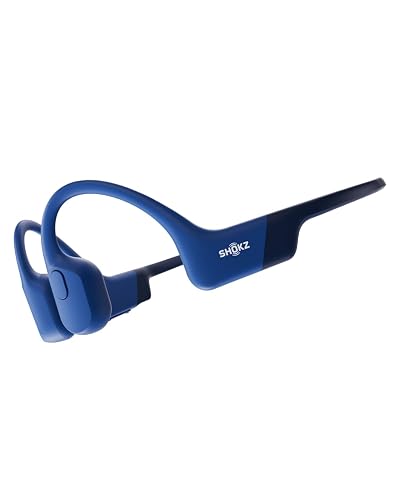
A standard headphone pushes sound into the ear canal, where it travels to the eardrum and the cochlea. A bone conduction headphone uses a small transducer that rests on the cheekbone in front of the ear and vibrates the bone. Those vibrations reach the inner ear directly, so the sound is perceived without blocking the ear canal.
Shopping for one? See our guide: 8 Best AfterShokz Titanium Wireless Bone Conduction Headphones Compareds.
Because the sound still reaches the cochlea, the inner ear’s hair cells can still be overstimulated. Hearing damage depends on how loud the sound is at the inner ear and how long it lasts. It does not depend on whether the sound arrived through air or bone. Audiologists generally treat sustained exposure above about 85 decibels as a risk, and the risk rises quickly as the level goes up. A rough rule is that the safe listening time halves for every 3 dB increase, which is why turning the volume up even a little matters.
Bone conduction also has a different sound profile. Many models are less efficient at low frequencies, so listeners often turn the volume higher to get a full sound. That tendency can push the level past the point where your ears would otherwise tell you to stop.
Measuring Your Listening Exposure
You do not need specialized equipment to get a useful estimate of your exposure. Start by finding out how loud your device gets at its maximum setting and how loud you usually listen.
Step 1: Check the maximum output
- Look in the manufacturer’s specifications for maximum sound pressure level (SPL). Many manufacturers list a figure in decibels.
- If the figure is not listed, check the device’s documentation for a volume limit setting or a companion app that caps output.
- Note whether the phone or player has its own volume ceiling. The lower of the two limits your real exposure.
Step 2: Estimate your typical level
- Play your normal content at the volume you usually choose.
- Use a free decibel meter app on a phone held near the headphone transducer, or compare your setting to the percentage of maximum volume. Remember that app readings are approximate.
- Write down the level you settle on in quiet rooms and noisy places. Noisy places often push people to turn up the volume, which is where most overexposure happens.
Step 3: Compare against time limits
Use the following general reference. Consult a professional audiologist for guidance specific to your ears, especially if you have existing hearing loss or tinnitus.
| Approximate sound level | Typical example | Rough safe daily listening time |
|---|---|---|
| 70 dB | Quiet conversation, soft background music | Little to no limit for most people |
| 80 dB | Busy traffic, loud restaurant | Several hours |
| 85 dB | Heavy city traffic, many lawn mowers | About 8 hours |
| 90 dB | Motorcycle, power tools | About 2 hours |
| 100 dB | Loud concert, leaf blower | About 15 minutes |
These figures follow common occupational exposure guidance, which uses a 3 dB exchange rate. They are reference points, not guarantees. Two people can react differently to the same level.
Setting Up Your Headphones to Protect Your Hearing
Good habits matter more than any single feature. Most of the protection comes from how you configure the device before you start listening.
Use the device’s volume limiter
Many phones and audio apps offer a maximum volume setting or a headphone safety feature that warns you when levels stay high for long periods. Enable these before you start a listening session. Set the cap at a level where speech is clear at a normal conversational distance, not where you need to strain to hear.
Check fit and placement
Bone conduction headphones need firm contact with the cheekbone to transmit sound well. A poor fit forces you to raise the volume to compensate. Adjust the band so the transducer sits flat against the bone just in front of the ear, without pressing hard enough to cause soreness.
Use the “conversation test”
Set your volume so you can hear someone speaking at arm’s length without any extra effort. If you have to turn up the volume to hear over ambient noise, the environment may be too loud for extended use, and you should consider a lower-noise location or a pause.
Take listening breaks
Short breaks give your auditory system time to recover from temporary threshold shift, the short-term dip in hearing sensitivity that follows loud exposure. Stopping for a few minutes every hour is a simple and practical habit.
Environmental Factors That Push Exposure Higher
Your headphones are only part of the equation. The surrounding environment often determines how loud you need to listen.
- Traffic and wind: Road noise and wind across the microphones can push listeners to turn the volume up significantly.
- Gym and outdoor workouts: Gym equipment and crowds raise ambient levels, while cycling and running create wind noise.
- Public transit: Trains and buses are often loud enough to mask quieter content, leading to higher volume settings.
- Music at high dynamic range: Tracks with quiet passages followed by loud sections can tempt you to set the volume for the loud parts, which can be harsh at the quiet ones.
Because bone conduction leaves the ear canal open, you hear ambient noise as well. That combination can make the effective exposure higher than the device’s output alone suggests, so you may want to test your settings in the environments where you use them most.
Common Mistakes to Avoid
- Assuming open-ear design means the device is automatically safe at any volume.
- Raising the volume to overcome a loose or poorly placed headset.
- Listening continuously for many hours in loud places without a break.
- Ignoring symptoms such as ringing, muffled hearing after a session, or sounds seeming distorted.
- Using the highest volume setting on both the phone and the headphone app at the same time.
- Skipping a hearing check when you already notice changes in your hearing.
Tips for Long-Term Hearing Protection
- Keep the device’s volume at a level where you can still hear your surroundings.
- Use a decibel meter app periodically to recalibrate your sense of loud and quiet.
- Choose content with a moderate dynamic range when you listen in noisy places.
- Schedule a baseline hearing test with an audiologist if you use headphones daily for long periods.
- Stop listening and seek medical advice if you develop persistent tinnitus, pain, or a sudden change in hearing.
Recommended gear
A few accessories can make it easier to keep your listening levels in check.
- A decibel meter app: A free sound level meter gives you a rough reading of your environment and helps you check whether your chosen volume is reasonable in a given location.
View on Amazon - A pair of over-ear hearing protectors: When you know you will be in very loud settings like machinery or events, protectors reduce the ambient level before you add any audio.
View on Amazon - A replacement charging cable with a consistent connector: A stable connection avoids the frustration of intermittent audio that prompts you to turn the volume up.
View on Amazon
If you are looking at specific models for workouts or outdoor use, you can compare options in articles such as Best Bone Conduction Headphones for Sports: 3 Models Compared and Bone Conduction Headphones Side Effects: What to Know and How to Reduce Them.
FAQ
Can bone conduction headphones cause permanent hearing loss?
They can, if the sound is loud enough for long enough. The inner ear hair cells can be damaged by sustained high levels regardless of how sound reaches them. Keeping volume moderate and taking breaks lowers that risk.
Are bone conduction headphones safer than earbuds?
They may be less likely to create a sealed, high-pressure environment in the ear canal, but that does not make them automatically safer. Exposure depends on volume and duration in both cases. Open-ear designs still allow sound to reach the cochlea.
How loud is too loud for bone conduction headphones?
There is no single number that applies to everyone. As a general guide, many occupational standards treat sustained levels around 85 dB as a threshold for concern. If you have to shout to be heard over the device, it is probably too loud.
Can I use bone conduction headphones while running or cycling?
Yes, and many people do. Keep the volume low enough that you can hear traffic and your surroundings, and avoid high settings in windy or noisy conditions. You can read more in Top 6 Best Bone Conduction Headphones for Cycling: Buyer's Guide.
Do bone conduction headphones cause tinnitus?
Loud listening can contribute to tinnitus in some people. If you notice ringing that persists after you stop listening, stop using the device and consult a healthcare professional.
Is there a safe daily listening limit?
General guidance suggests about 8 hours per day at 85 dB, with shorter times at higher levels. These figures are approximate, so use them as a reference rather than a strict rule.
What should I do if my hearing changes after using headphones?
Stop using the headphones at high volume and book an appointment with an audiologist or doctor. Early evaluation can help identify whether the change is temporary or needs treatment.
Conclusion
Bone conduction headphones can contribute to hearing damage, but the risk comes from volume and time, not from the transducer design. By checking maximum output, estimating your typical level, and using a volume limiter and regular breaks, you can enjoy open-ear listening safely. If you notice any changes in your hearing, consult an audiologist promptly.
Related reading
Ready to choose one?
About Ethan Brooks
Ethan Brooks is part of our editorial team and reviews and edits our headphone tech & types guides, checking product details against manufacturer specifications and owner feedback.