 By Ethan Brooks
Updated November 2026
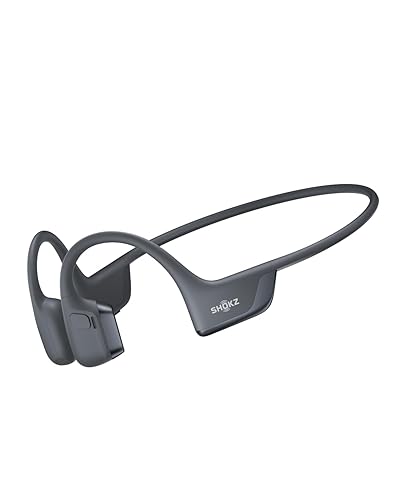
Bone conduction headphones can sit alongside a bike helmet, letting you hear music, calls or navigation prompts while your ears stay open to traffic. The key to using them well is getting a snug, stable fit under the helmet straps, setting a volume that keeps road sounds audible, and checking that the arms do not press into your temples at speed. This guide walks through each step. If you want more background, see Earplugs for Bone Conduction Headphones: How to Choose and Use Them Safely.
Check Whether Your Helmet and Headphones Are Compatible
Not every bone conduction model works well with a bike helmet. The headphone arms need to rest on your cheekbones just in front of the ear, and the helmet’s chin strap and side straps must not cross the transducer pads. Before you ride, put on the helmet, fasten the chin strap, and then position the headphones. If the helmet pushes them forward or lifts them off the skin, try a different model or a different arm position. For general placement rules, see our guide on Where to Place Bone Conduction Headphones: A Step-by-Step Fit Guide.
Shopping for one? See our guide: AfterShokz Titanium Wireless Bone Conduction Headphones Review (2026).
Fit the Headphones Under the Helmet Straps
- Fasten the helmet and adjust the chin strap so it sits snugly under your chin.
- Slide the headphone arms on so the transducers rest lightly on the cheekbones, just in front of the ear canal.
- Check that the side straps of the helmet run above or behind the arms, not across the transducer pads.
- Shake your head side to side and nod. The headphones should stay in place without pressing hard.
- Tighten the helmet only if needed, then recheck the headphone position afterward.
A loose fit reduces audio quality because the transducers lose contact with the bone. A tight fit can cause soreness on long rides. Aim for light, steady pressure. 7 Best Bone Conduction Headphones for Motorcycle Helmet Riders (2026) goes further into this.
Set Volume and Protect Your Hearing
Bone conduction leaves your ear canals open, so you still hear the road. That is the main safety benefit, but it also means background noise, such as wind and engine sounds from cars, can mask your audio. Many riders find that they raise the volume too far to compensate. Keep the level low enough that you can still hear horns, sirens and traffic clearly. Most manufacturers recommend avoiding sustained high volume, so take breaks if you notice ringing or fatigue afterward.
Plan Your Riding Setup Before You Ride
Pair your headphones and test them at home before a ride. Check that calls, music and voice assistant prompts work at your intended volume. Keep the controls reachable with gloves on, and store the phone where you can see navigation without looking down for long periods. A simple setup routine reduces distraction once you are moving.
- Test the fit with the helmet on, not off.
- Confirm the volume is audible over wind and traffic at a stop.
- Charge the headphones fully before the ride.
- Keep the headphones dry or use models with water resistance if you ride in rain.
Common Mistakes
- Wearing the helmet straps over the transducer pads, which blocks sound and shifts the fit.
- Turning the volume up to drown out wind noise, which reduces awareness of traffic.
- Skipping the pre-ride fit check and discovering the problem only after the first mile.
- Assuming any bone conduction model suits a helmet without checking the arm shape.
Recommended Gear
A sport-focused bone conduction model designed for active use is generally a better starting point than a casual pair, since it is built to stay seated during movement. Look for models that list a helmet-friendly, open-ear design in the product description. View on Amazon
A clip-on phone mount for the handlebars helps you see navigation prompts without reaching for your pocket. Choose one with a secure locking mechanism for rough roads. View on Amazon
A helmet with a wide, adjustable retention system gives you more room to position the headphone arms without strap interference. View on Amazon
FAQ
Can bone conduction headphones fit under any bike helmet?
Not always. Fit depends on the helmet’s strap layout and the headphone arm shape, so test the combination before riding. For another angle, check out Stick On Bone Conduction Headphones: How to Place and Use Them.
Do bone conduction headphones block road noise?
No. They leave your ear canals open, so you can still hear traffic. That is one reason they are popular with cyclists.
Is it safe to listen to music while cycling?
Open-ear designs keep you aware of surroundings, but keep the volume low and follow local laws on headphone use. Check your local regulations for current rules.
Conclusion
Bone conduction headphones can work well with a bike helmet when the fit is right and the volume is kept low enough to hear traffic. Test the setup at home, check the position after every helmet adjustment, and keep your attention on the road. Consult a professional fitter or your helmet manufacturer if you have questions about compatibility.
Related reading
- Bone Conduction Headphones Helmet: How to Fit and Use Them Safely (2026)
- Xiaomi Bone Conduction Headphones Pairing: Step-by-Step Guide (2026)
- Wireless Bone Conduction Headphones UK: How to Choose the Right Pair (2026)
- Wireless Bone Conduction Headphones Aftershokz: 5 Best Picks Compared (2026)
Ready to choose one?
About Ethan Brooks
Ethan Brooks is part of our editorial team and reviews and edits our headphone tech & types guides, checking product details against manufacturer specifications and owner feedback.