 By Ethan Brooks
Updated November 2026
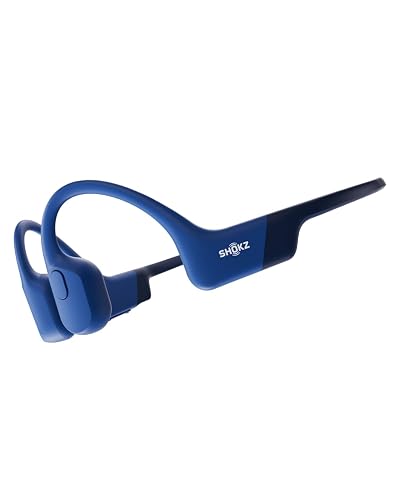
Bone conduction BT headphones send sound through your cheekbones instead of your ear canal, so you can hear music or calls while keeping your ears open to traffic, coworkers and trail sounds. This guide explains how the technology works, the six factors that matter most when choosing a pair, and the setup habits that keep them comfortable and safe. By the end, you will know how to narrow the field to the right model for your activity.
How Bone Conduction BT Headphones Work
Standard earbuds push air-borne sound through the ear canal and into the eardrum. Bone conduction units skip that path. A small transducer sits against the cheekbone just in front of the ear, and it vibrates the bone. The vibration travels through the skull to the inner ear, where the cochlea converts it into nerve signals the brain reads as sound.
Shopping for one? See our guide: AfterShokz Titanium Wireless Bone Conduction Headphones Review (2026).
The “BT” part refers to Bluetooth. Most bone conduction BT headphones connect to a phone, tablet or laptop wirelessly, handle playback controls on a side pod or band, and include a built-in microphone for calls. Some models also offer multipoint pairing or support for voice assistants.
Factor 1: Fit and Band Design
Fit decides how much bass you hear and how comfortable the headset feels after an hour. Bone conduction transducers need steady contact with the skin, but too much pressure causes soreness.
- Look for a band that wraps behind the head rather than over the crown, since this distributes weight more evenly.
- Check whether the band is adjustable. Many owners report that models with sliding or ratcheting arms fit a wider range of head sizes.
- Consider the band material. Titanium and flexible polymer bands tend to flex without creating hot spots, while thin metal can pinch.
- Test the fit with glasses or a hat if you plan to wear them that way, because temple arms and brims can shift the transducer.
Factor 2: Sound Quality Expectations
Bone conduction does not produce the same full-range sound as an in-ear or over-ear design. Bass is usually weaker, and the sound can feel thinner at high volumes. Speech, podcasts and audiobooks generally sound clear, while complex orchestral or bass-heavy music may feel flat.
If you mostly listen to spoken content or use your headphones for navigation prompts and calls, that tradeoff rarely matters. If music quality is your priority, consider an open-ear design with a different driver type. Our overview of Open-Ear and Bone Conduction Headphones Explained compares the two approaches in more detail.
Factor 3: Bluetooth Version, Codecs and Battery Life
Connection quality depends on the Bluetooth version and supported codecs. Newer Bluetooth versions generally offer better range and more stable connections, while codecs affect audio resolution.
| Spec | What to look for | Why it matters |
|---|---|---|
| Bluetooth version | 5.0 or newer | More stable link and better range |
| Codecs | SBC, AAC; aptX if you use Android devices that support it | Affects audio quality over the wireless link |
| Battery life | Check the manufacturer’s stated hours | Determines how long a single charge lasts for your sessions |
| Charging | USB-C preferred | Faster and more common cable standard |
Battery claims are usually measured at moderate volume, so expect shorter runtimes if you listen loudly or take calls often. Several owners of popular models say they plan for a little less than the listed time on a long run.
Factor 4: Water and Sweat Resistance
If you plan to use bone conduction BT headphones for running, cycling or swimming, check the IP rating. The first digit covers dust protection and the second covers water. An IP67 rating means the unit resists dust and can survive temporary immersion, while IP68 typically indicates longer submersion depth as stated by the manufacturer. Rinse sweat off after workouts and never assume a rating covers hot water, soap or chlorine residue.
Factor 5: Microphone and Call Quality
Bone conduction headsets are popular for calls because the open ear keeps you aware of your surroundings. Microphone quality still varies a lot. Look for models that mention noise reduction on the mic, and try to place the boom or pickup close to your mouth. Windy outdoor calls expose weak microphones quickly, so check the spec sheet for wind handling if you plan to use it while walking or cycling.
Factor 6: Safety and Volume Habits
Bone conduction keeps the ear canal open, which many users find more comfortable for long wear. Even so, loud playback can still harm hearing over time. Health agencies generally recommend keeping listening volume at a moderate level and taking regular breaks. Consult an audiologist or your physician if you have hearing loss, tinnitus, or questions about medical devices.
For a deeper look at risks and how to reduce them, read Bone Conduction Headphones Hearing Damage: What Causes It and How to Avoid It and Bone Conduction Headphones Side Effects: What to Know and How to Reduce Them.
Step-by-Step: Setting Up Your New Pair
- Charge the headset fully before first use, following the manufacturer’s instructions.
- Pair it through your phone’s Bluetooth menu while the headset is in pairing mode.
- Place the transducers on the cheekbones just in front of the ear openings, not on the ear itself.
- Adjust the band until the units feel snug without pressure. Shake your head gently to test stability.
- Play a familiar track at moderate volume and raise it gradually until the sound is clear.
- Run a short test call to check the microphone and the level your contact hears.
Common Mistakes to Avoid
- Overtightening the band, which causes soreness during long sessions.
- Placing the transducers too high on the cheekbone, where contact weakens.
- Expecting deep bass from a design that relies on bone vibration.
- Ignoring the IP rating and exposing the unit to hot water or chemicals.
- Running the volume high for long periods on the assumption that open ears are always safe.
Tips for Getting the Most From Bone Conduction BT Headphones
- Clean the transducer contact points with a dry cloth to keep the connection solid.
- Store the headset with the band relaxed rather than bent tight, which preserves the spring.
- If you plan a sport-focused setup, compare models for sweat resistance and secure fit using Best Bone Conduction Headphones for Sports: 3 Models Compared.
- Look at how others describe real-world use in Bone Conduction Headphones Reddit: What Owners Actually Say (2026) before committing.
Recommended Gear
A few accessories make everyday use easier. Pick the ones that match your activity.
- Aftershokz Titanium: a well-known bone conduction model with a titanium band, useful as a reference point for fit and sound expectations. View on Amazon
- Aftershokz Aeropex: a lightweight option with a band designed for extended wear during running. View on Amazon
- Raycon Bone Conduction Headphones: an alternative style worth comparing if you want a different fit and control layout. View on Amazon
For a fuller comparison across sports and everyday use, see Wireless Bone Conduction Headphones Aftershokz: 5 Best Picks Compared (2026).
FAQ
Do bone conduction BT headphones block outside sound?
No. Because the ear canal stays open, you can hear traffic, announcements and people nearby. That is the main reason many runners and cyclists prefer them.
Are bone conduction headphones good for music?
They work well for podcasts, audiobooks and calls. Music sounds clear but usually lacks deep bass compared with in-ear or over-ear designs.
How long do bone conduction BT headphones last on one charge?
Runtime depends on the model and volume level. Check the manufacturer’s stated hours and expect less when you listen loudly or use the microphone often.
Can I wear bone conduction headphones with glasses?
Many people can, but temple arms may shift the transducers. Test the fit with your glasses on before a long session.
Are they waterproof?
It depends on the IP rating. Models with IP67 or IP68 ratings resist sweat and rain, but you should check the manufacturer’s limits before swimming or using them in hot water.
Do bone conduction headphones work with iPhone and Android?
Most standard Bluetooth models pair with both platforms. Codec support can differ, so check which audio codecs the headset lists.
Are bone conduction headphones safe for hearing?
They keep the ear canal open, which many users find comfortable, but loud volume can still affect hearing over time. Keep levels moderate and consult a professional if you have hearing concerns.
Conclusion
Choosing bone conduction BT headphones comes down to fit, realistic sound expectations, connection specs and water resistance. Match those factors to your main use, whether that is running, calls or everyday listening. Keep volume moderate and consult an audiologist if you have hearing concerns. With the right pair and a careful setup, you can stay aware of your surroundings while enjoying your audio.
Ready to choose one?
About Ethan Brooks
Ethan Brooks is part of our editorial team and reviews and edits our headphone tech & types guides, checking product details against manufacturer specifications and owner feedback.