 By Ethan Brooks
Updated November 2026
Bone conduction running headphones send sound through your cheekbones instead of your ear canal, so you can hear music or cues while still tracking traffic, training partners and trail noise. In this guide you will learn how the technology works, which specs actually matter for runners, how to test fit before you commit, and how to set your volume so you protect your hearing. By the end, you should be able to narrow a long list of models down to two or three that suit your running style.
How Bone Conduction Running Headphones Work
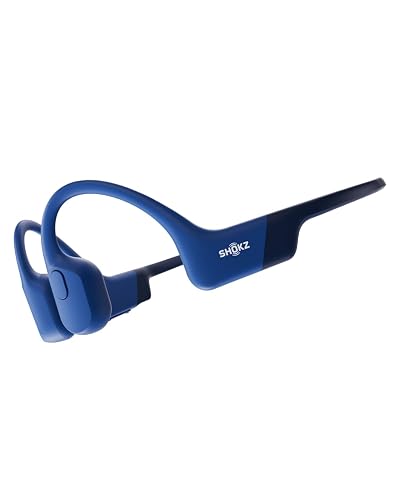
Standard earbuds seal into or sit inside the ear canal and push sound directly toward the eardrum. Bone conduction units rest on the cheekbone just in front of the ear and use small transducers to vibrate the skull. That vibration reaches the cochlea through bone, bypassing the outer and middle ear. Your ear canal stays open, which is why many runners choose this design for outdoor routes.
Shopping for one? See our guide: 7 Best Wired Bone Conduction Headphones for Running and Daily Use (2026).
The trade-off is that bone conduction typically produces less bass than in-ear or over-ear designs, and sound can leak slightly at higher volumes. For most runners, that is an acceptable compromise in exchange for situational awareness. If you want a broader overview of how this category compares with other open designs, see Open-Ear and Bone Conduction Headphones Explained.
Why Runners Choose Open-Ear Audio
The main reason to pick bone conduction for running is safety. With your ears uncovered, you can hear approaching cyclists, car horns, dog walkers and training partners calling out. Many runners also find that sweaty, sealed earbuds cause irritation or slip out mid-stride, while bone conduction hooks or bands tend to stay put through a long session.
Open-ear audio also reduces the pressure buildup some people feel with in-ear designs. Owners often describe a more natural sound environment on easy runs, though they also note that wind and traffic can compete with the audio at higher speeds.
Key Factors to Check Before You Buy
Use this checklist to compare models on the same terms:
- Fit style: Band-style (wraps behind the head) or hook-style (loops over the ear). Band styles are more common for running.
- Weight: Lighter units, often in the 25 to 35 gram range for many sport models, tend to cause less fatigue on long runs. Check the manufacturer’s listed weight.
- IP rating: Look for IP55 or higher for sweat and light rain resistance. IP67 or IP68 means better submersion protection, which matters if you run in heavy weather.
- Battery life: Manufacturers list talk time and music playback separately. For runs, plan around the music figure and leave margin for cold weather, which shortens battery life.
- Codec support: Bluetooth codecs such as SBC are standard. AAC is common on iPhones, and aptX variants appear on some Android-focused models. Codec matters less for bone conduction than for in-ear audio, but it still affects latency and stability.
- Controls: Physical buttons are easier to use mid-run than touch panels, especially with gloves or sweaty fingers.
- Microphone: If you take calls or use voice assistants, check the mic quality. Our roundup of 7 Best Bone Conduction Headphones with Microphone for Work and Calls (2026) covers this in more depth.
Step-by-Step: Testing Fit Before a Long Run
Fit makes or breaks bone conduction. Even a well-designed unit will rattle or lose contact if it sits in the wrong place.
- Locate the transducer point. Place your fingertip just in front of the tragus, the small flap covering your ear canal, and move slightly toward the cheekbone until you feel a firm, bony area. The pads should rest there.
- Position the band. Wrap the band behind your head so it sits just above the neck, not on it. The pads should press lightly, not dig in.
- Check contact with a head shake. Play music at moderate volume, shake your head side to side and bounce gently. Audio should stay steady. If bass drops out, tighten the band or adjust the pad angle.
- Test a short jog. Run 10 to 15 minutes before committing to a longer session. Watch for pressure on the cheekbone or temple. Mild pressure is normal; sharp pain is not.
- Re-check after sweat. Sweat can change grip. Some runners find a silicone-coated band holds better than a fabric one.
Setting Volume and Protecting Your Hearing
Bone conduction does not eliminate the risk of hearing damage. Loud audio at any delivery method can contribute to noise-induced hearing loss over time. A practical rule is to keep volume at a level where you can still hear your footfalls and ambient sounds. If you have to raise your voice to talk with a running partner, the volume is likely too high. For a deeper look at risk, read Bone Conduction Headphones Hearing Damage: What Causes It and How to Avoid It.
If you have ear pain, tinnitus, or any existing hearing condition, talk with an audiologist or physician before relying on any audio device for long sessions.
Common Mistakes to Avoid
- Buying on sound alone. Demo sound in a store is not the same as audio on a moving body. Prioritize fit and stability.
- Wearing them too loosely. Loose units lose bass and can slide during intervals.
- Cranking the volume to beat wind. Wind noise rises with pace. Use a windscreen-style setting or a quieter route instead of excessive volume.
- Ignoring sweat resistance. A unit that handles light sweat may fail in heavy summer humidity. Check the IP rating against your conditions.
- Forgetting to charge before long runs. Cold weather drains batteries faster than most manufacturers’ indoor tests suggest.
Tips for Better Results
- Keep a dry cloth in your pocket to wipe the pads and cheek area mid-run.
- Use a headphone-safe running belt or pocket to avoid cable tugging if you choose a wired model.
- Pair with a running app that offers audio cues so you hear pace feedback without looking at your watch.
- Check firmware updates; some manufacturers improve Bluetooth stability after release.
- If you run in traffic, choose routes with sidewalks and test your volume at intersections before a full session.
Recommended gear
These accessories help runners get more from bone conduction audio.
- Running armband for phones: A secure armband keeps your phone steady and within Bluetooth range during runs. View on Amazon
- Sweat-resistant headband or cap: A thin cap or headband can help hold a band-style unit in place and reduce sweat on the pads. View on Amazon
- Spare USB charging cable: A short, durable cable makes it easy to top up before a run. View on Amazon
FAQ
Are bone conduction running headphones safe to use every day?
They are generally considered lower risk for ear canal health because the canal stays open, but volume still matters. Keep levels moderate and take breaks if your ears feel fatigued.
Do bone conduction headphones work with a heart rate monitor?
Audio and heart rate sensing are separate. Most bone conduction units do not measure heart rate, so you will still need a chest strap or watch for that data.
Will bone conduction headphones stay on during intervals?
Band-style models with a snug, properly positioned fit typically stay on through sprints. Test the fit with a short interval session before committing to a long race.
Do they block wind noise?
Not fully. Wind can still compete with audio, especially at higher speeds. Choosing a sheltered route or keeping volume moderate usually helps more than raising the level.
Can I use them for phone calls while running?
Many models include a microphone, but call quality varies with wind and distance from your mouth. Check reviews focused on mic performance if calls are important to you.
Are they waterproof enough for rain runs?
Light rain is usually fine for IP55 and higher ratings. For heavy rain or swimming, look for IP67 or IP68 and confirm the rating with the manufacturer.
How long should I wait before buying a replacement if the audio drops?
First, check the fit and recharge the unit, then reset the Bluetooth pairing. If problems continue after a firmware update, contact the manufacturer’s support team about warranty options.
Is bone conduction better than open-ear earbuds for running?
It depends on your priorities. Bone conduction keeps the ear canal fully open and often feels lighter on long runs, while some open-ear earbuds deliver better bass. Compare both against your route and comfort needs.
Conclusion
Bone conduction running headphones let you keep your ears open while enjoying music, podcasts or coaching cues. Focus on fit, IP rating, weight and battery life rather than sound alone, and always test the pair on a short run first. Keep volume moderate so you stay aware of your surroundings and protect your hearing over the long term.
Related reading
- 7 Best Bone Conduction Headphones for Running in 2026
- Top 7 Bone Conduction Open-Ear Headphones Compareds for Every Need
Ready to choose one?
About Ethan Brooks
Ethan Brooks is part of our editorial team and reviews and edits our headphone tech & types guides, checking product details against manufacturer specifications and owner feedback.