By Isabella Keller
Updated November 2026
Anyone who spends hours on video meetings, phone calls or customer support lines knows how quickly background noise wears on both the listener and the speaker. A noise cancelling headset microphone helps by reducing the sounds around you before they reach the mic, so your voice comes through clearer. This guide looks at seven popular options, selected by how well their specifications match common calling needs, how established the brand is, and the patterns owners tend to describe in their feedback. Nothing here comes from our own lab testing; the comparisons rely on manufacturer specifications and published owner experience.
Our top picks at a glance
- 1
 TOP CHOICEBest overallLogitech H390 Wired USB-A Headset with Noise Cancelling MicrophoneView on Amazon
- 2
 TOP CHOICEBest for wireless freedom at a deskHeadset with Microphone for PC, Bluetooth 5.4 Noise Cancelling HeadphoView on Amazon
- 3
 TOP CHOICEBest budget pickJIAMQISHI USB Headset with Microphone for PC, On-Ear Computer Laptop HView on Amazon
- 4
 Best for call centersEKSA H8 USB Headset with Microphone for Work, Stereo Wired Computer Headphones with MicView on Amazon
- 5
 Best for mobile and dual-device useJIAMQISHI Wireless Headset with Mic for Work, Bluetooth V5.2 HeadphoneView on Amazon
- 6
 Best for noisy environmentsTrucker Bluetooth Headset, Wireless Headset with Mic, Dual Noise Cancelling MicrophoneView on Amazon
- 7
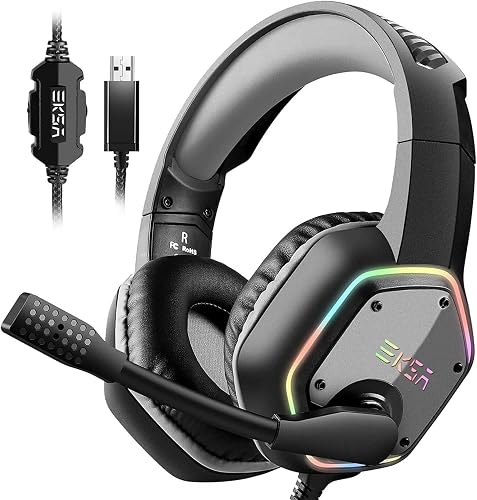 Best for gaming and callsComputer Headphones with Microphone Noise Cancelling, RGB Light, WiredView on Amazon
Our Top Picks
We ordered these by how closely each one fits the core criteria: microphone noise rejection, wired or wireless reliability, comfort for long sessions, and compatibility with common office and softphone setups. Read the table first, then the individual reviews for detail.
Quick Comparison
| Product | Best for | Key feature |
|---|---|---|
| Logitech H390 Wired USB-A Headset | Daily office calls | Noise cancelling boom microphone with plug-and-play USB |
| Bluetooth 5.4 Headset with Mic for Work | Desk users who move around | Hybrid ANC and ENC mic processing with flip-to-mute |
| JIAMQISHI USB Headset (on-ear) | Budget home office setups | In-line volume and mute controls |
| EKSA H8 USB Headset | Call center and Teams use | USB-C and USB-A connection with in-line controls |
| JIAMQISHI Wireless Headset with USB Dongle | Switching between PC and phone | Bluetooth V5.2 with dongle for a stable PC link |
| Trucker Bluetooth Headset | Vehicles and loud spaces | Dual noise cancelling microphones and long working time |
| EKSA E1000 USB Gaming Headset | Gaming plus voice chat | RGB lighting and 7.1 surround sound with a noise cancelling mic |
Logitech H390 Wired USB-A Headset with Noise Cancelling Microphone
Wired Headphones with Mic for PC, Noise Cancelling Microphone for Video Meetings, Music Logitech H390 Wired USB-A Headset with Noise Cancelling Microphone – Black
Best for: Daily office calls where reliability matters more than wireless freedom.
This is a wired over-ear design aimed at people who sit at one workstation for most of the day and want a headset that simply works when plugged in. Owners frequently mention that the boom mic keeps speech clear without much fuss about placement.
Key specs
- Wired USB-A connection
- Noise cancelling boom microphone
- In-line volume control and mute
Pros
- Plug-and-play setup on most Windows and Mac computers
- Microphone rejects steady background sound well for everyday office calls
- Lightweight frame suited to long sessions
Cons
- The cable limits how far you can move from the computer
- No Bluetooth, so it cannot pair with a phone directly
Bottom line: A strong default choice for someone who wants a dependable wired headset for desk-based calls.
Headset with Microphone for PC, Bluetooth 5.4 Noise Cancelling Headphones with Mic for Work
Headset with Microphone for PC, Bluetooth 5.4 Noise Cancelling Headphones with Mic for Call Center/Home/Computer/Phones Upgrade ANC & ENC Wireless Headset with Mic for Work(Flip-to-Mute & Dongle)
Best for: Desk users who want wireless freedom with active noise cancelling on the headset side.
This model combines active noise cancelling for the listener with environmental noise reduction on the microphone. It suits people who take calls from different spots in the room and want to step away from the desk without losing the connection.
Key specs
- Bluetooth 5.4 wireless connection
- ANC and ENC noise reduction
- Flip-to-mute microphone and USB dongle included
Pros
- Wireless range suits moving around an office or home
- Flip-to-mute is quick to use during calls
- Dongle gives a more stable PC connection than many Bluetooth-only headsets
Cons
- Battery needs regular charging during heavy use
- Wireless audio can add slight delay compared with a wired connection
Bottom line: The best fit for someone who values movement and wants active noise reduction at a desk.
JIAMQISHI USB Headset with Microphone for PC, On-Ear Computer Laptop Headphones with Noise Cancelling Microphone
JIAMQISHI USB Headset with Microphone for PC, On-Ear Computer Laptop Headphones with Noise Cancelling Microphone in-line Control for Home Office Online Class Skype Zoom (USB+3.5mm, Black)
Best for: Budget home office setups and online classes.
This on-ear USB headset is designed for straightforward voice calls on a laptop or desktop. Its in-line controls make it easy to mute or adjust volume without reaching for the computer.
Key specs
- USB and 3.5mm connection options
- Noise cancelling microphone
- In-line control for volume and mute
Pros
- Affordable entry point for a dedicated call headset
- In-line mute is handy during group calls
- Dual connection options work with more devices
Cons
- On-ear cups can feel tight over long periods
- Isolation from outside sound is basic compared with over-ear designs
Bottom line: A sensible budget pick for students and home workers who need clear voice pickup without spending heavily.
EKSA H8 USB Headset with Microphone for Work, Stereo Wired Computer Headphones with Mic
EKSA H8 USB Headset with Microphone for Work, Stereo Wired Computer Headphones with Mic Noise Cancelling, in Line Controls, 3.5mm Jack USB-C/A Over-Ear Headset for PC Laptop Office Call Center Teams
Best for: Call center staff and frequent Teams or Zoom users.
This wired over-ear headset targets office and contact center environments, with a USB connection that handles audio independently of the computer’s sound card. The noise cancelling mic is designed to keep focus on the speaker’s voice.
Key specs
- USB-C and USB-A connection
- 3.5mm jack option
- Noise cancelling microphone with in-line controls
Pros
- Connects to newer laptops with USB-C directly
- Over-ear fit suits longer shifts
- In-line controls keep common adjustments close at hand
Cons
- Wired design limits movement
- Headband adjustment range may be limited for very large heads
Bottom line: A practical choice for call center or conferencing use where a stable wired connection matters most.
JIAMQISHI Wireless Headset with Mic for Work, Bluetooth V5.2 Headphones with Noise Cancelling Microphone
JIAMQISHI Wireless Headset with Mic for Work, Bluetooth V5.2 Headphones with Noise Cancelling Microphone, USB Dongle, Clear Calls & Mic Mute, for Laptop, PC, iPhone & Android Phones
Best for: People who switch between a computer and a smartphone during the day.
This wireless headset pairs over Bluetooth for phones and uses a USB dongle for a steadier PC connection. The mic mute function is useful when you need to step away from a call quickly.
Key specs
- Bluetooth V5.2 connection
- USB dongle for PC use
- Noise cancelling microphone with mic mute
Pros
- Works with both computers and phones
- Dongle reduces the lag some Bluetooth-only headsets show on PCs
- Mic mute is easy to reach
Cons
- Switching between devices can take a few seconds to reconnect
- Battery life is shorter with constant ANC use
Bottom line: A versatile pick for hybrid workers juggling a laptop and a phone.
Trucker Bluetooth Headset, Wireless Headset with Mic, Dual Noise Cancelling Microphone
Trucker Bluetooth Headset, Wireless Headset with Mic, Bluetooth Headsets with Dual Noise Cancelling Microphone & Mute Button, 55Hrs Working Time PC Headsets for Cell Phones, Computer, Truck Driver
Best for: Drivers, field workers and anyone calling from loud spaces.
This headset is built around its dual microphone arrangement, which is meant to pick up the speaker’s voice while rejecting road and wind noise. Owners often describe it as a practical choice for calls made from a vehicle.
Key specs
- Bluetooth wireless connection
- Dual noise cancelling microphones
- Mute button and long working time as listed by the manufacturer
Pros
- Dual mic design helps in windy or loud conditions
- Long working time suits full shifts
- Mute button is accessible while driving
Cons
- Bulkier fit than slim earpiece designs
- Audio quality for music is secondary to voice clarity
Bottom line: Best for people whose calls happen in loud or moving environments rather than quiet offices.
Computer Headphones with Microphone Noise Cancelling, RGB Light, EKSA E1000 USB PC Gaming Headset
Computer Headphones with Microphone Noise Cancelling, RGB Light, Wired Headphones for PS4, PS5 Console, Laptop, Call Center EKSA E1000 USB PC Gaming Headset with Mic, 7.1 Surround Sound
Best for: Gamers who also take voice chat and occasional work calls.
This wired gaming headset pairs a noise cancelling microphone with surround sound processing for games. It works on PCs and consoles, which makes it a flexible option for mixed use.
Key specs
- Wired USB connection
- 7.1 surround sound as listed
- Noise cancelling microphone for voice chat
Pros
- Good fit for both gaming and voice calls
- Works with PC and console setups
- Microphone isolates voice from keyboard and room noise
Cons
- Surround features are less useful for purely office calls
- Wired cable limits movement
Bottom line: A good match for gamers who want one headset for voice chat and calls.
Buying Guide
Microphone Noise Rejection and Pickup Pattern
The microphone does most of the work in a noise cancelling headset microphone. Look for models that describe a boom or noise cancelling mic designed to pick up sound from close to the mouth and reject sound from the sides and rear. Directional pickup matters more than raw sensitivity for calls. A mic that hears everything will carry keyboard clicks and fan hum to the other end.
Good picks for this: Logitech H390 Wired USB-A Headset and EKSA H8 USB Headset
Active Noise Cancelling vs. Passive Isolation
Some headsets use active noise cancelling (ANC) to reduce sound reaching your ears, while others rely on passive isolation from cushioned ear cups. ANC helps in steady, low-frequency noise like fans or engines. Passive isolation works across more frequencies but depends on a good seal. Many people find that a snug over-ear fit does more than a basic ANC claim in an open office.
Good picks for this: Headset with Microphone for PC, Bluetooth 5.4 Noise Cancelling Headphones and Trucker Bluetooth Headset
Wired vs. Wireless Connection
Wired USB headsets generally offer a stable link with minimal audio delay and no battery to manage. Wireless Bluetooth models give you freedom to move but require charging and can show slight lag or reconnection delays when switching devices. A USB dongle, where included, often provides a more consistent PC connection than Bluetooth alone.
Good picks for this: Logitech H390 Wired USB-A Headset and JIAMQISHI Wireless Headset with USB Dongle
Fit, Comfort and Headband Adjustment
Comfort determines how long you can wear a headset without fatigue. Over-ear cups spread pressure across a larger area than on-ear pads, which many people find more comfortable for multi-hour sessions. Check the headband adjustment range against your head size, and look for padded headbands and breathable ear cushions. On-ear designs can feel tight after an hour or two for some users.
Good picks for this: EKSA H8 USB Headset and JIAMQISHI USB Headset with Microphone for PC
Battery Life and Charging
For wireless models, check the manufacturer’s stated talk time and standby time, and remember that active noise cancelling and constant use drain the battery faster. Plan a charging habit around your workday. Some headsets work while charging, which helps during long shifts. Wired models avoid this issue entirely.
Good picks for this: Trucker Bluetooth Headset and Headset with Microphone for PC, Bluetooth 5.4 Noise Cancelling Headphones
Controls and Mute Access
Quick access to mute and volume saves you from fumbling during meetings. In-line controls on a cable, flip-to-mute booms, and dedicated mute buttons all help. Check whether the mute indicator is clear, since a headset that silently mutes you can cause awkward moments on calls.
Good picks for this: JIAMQISHI USB Headset with Microphone for PC and Trucker Bluetooth Headset
Compatibility and Software
Confirm that the connector matches your device. USB-A, USB-C and 3.5mm jacks are common, and some headsets include adapters. Wireless models should list the Bluetooth version and whether they support multipoint pairing. For work platforms such as Teams or Zoom, check that the headset is listed as compatible or that the operating system recognizes it as a standard audio device. Gaming headsets may need additional driver support for surround features.
Good picks for this: EKSA E1000 USB PC Gaming Headset and JIAMQISHI Wireless Headset with USB Dongle
FAQ
What is a noise cancelling headset microphone?
A noise cancelling headset microphone is a headset mic designed to reduce background sound before it reaches the other person on a call. It typically uses a directional pickup pattern, and some models add digital processing to filter steady noise like fans or traffic.
Is noise cancelling on the microphone the same as active noise cancelling in the earcups?
No. Microphone noise cancelling affects what the other person hears from you. Active noise cancelling in the earcups reduces sound reaching your own ears. Some headsets include both, but they do different jobs.
Do wired headsets have better call quality than wireless ones?
Wired USB headsets often have lower latency and a more stable connection, which can help during calls. Good wireless models can still sound clear, especially when they use a USB dongle on a computer. Compare the specific models rather than assuming one connection type always wins.
How do I know if a headset will work with my computer or phone?
Check the connector type (USB-A, USB-C or 3.5mm) and the operating system support listed by the manufacturer. For Bluetooth models, confirm the version and whether the headset supports your phone or computer’s pairing method.
How long should a noise cancelling headset microphone last?
Lifespan depends on build quality, care and how often you use it. Wired headsets generally last as long as their cable and connector hold up. Wireless models are limited by battery wear, which tends to reduce runtime over several years. Manufacturers’ warranty terms are the best guide to expected durability.
Can a headset noise cancelling microphone help with gaming voice chat?
Yes. A directional, noise rejecting mic keeps keyboard clicks and room noise out of voice chat, which many players appreciate. Gaming headsets that combine this with surround sound offer both functions in one unit.
Should I replace my headset if the mic sounds muffled?
First check that the mic is not blocked, that the mute function is off and that the audio settings in your operating system or calling app select the correct input device. If the problem remains, the microphone may be worn or damaged, and a replacement is often the practical fix.
Conclusion
Choosing a noise cancelling headset microphone comes down to how and where you take calls. For reliable desk calls, a wired model such as the Logitech H390 is a dependable starting point. If you want to move around while staying connected, the Bluetooth 5.4 headset with ANC and ENC offers more freedom. Budget-conscious buyers will find the JIAMQISHI on-ear USB headset a sensible option, while call center and Teams users may prefer the EKSA H8. For mixed phone and computer use, the JIAMQISHI wireless model with its dongle is versatile, the Trucker Bluetooth headset suits loud or moving environments, and the EKSA E1000 covers gaming and voice chat together.
Read the buying guide factors above, check the connector and compatibility notes, and match the headset to your daily calling pattern. If you want deeper background, see How Active Noise Cancellation Works and When to Use It and Headphone Microphones: Pickup Patterns and Call Quality.
Sources
- Information on hearing health and safe listening levels, useful when choosing volume settings for long calls (nih.gov)
- Guidance on workplace noise exposure, relevant for headset use in busy offices and call centers (osha.gov)
- Standards and research papers on speech processing and audio transmission
Related reading
- Noise Cancelling Headset Wired: 6 Best Picks for Calls and Office Work (2026)
- Beste Noise Cancelling Headset: 6 Top Picks for Work and Travel (2026)

About Isabella Keller
Isabella focuses on practical advice for headphone tech & types: what matters before you buy, what to skip, and how to get more out of what you already own.